Blog
Published 22 October 2026Wispr Flow alternatives for Mac: an honest list
The best Wispr Flow alternative depends on why you are leaving. For offline dictation, look at Superwhisper, MacWhisper or VoiceInk; for a one-time price, VoiceInk or MacWhisper; for nothing to pay at all, Apple Dictation; for a cheaper cloud subscription, Aqua Voice or EaseMyPease.
I build EaseMyPease, which is on this list. That is why it is not first, and why every fact about the other apps below was read on the vendor's own site on 21 October 2026, with links at the end. If a vendor's page did not say something, I left it out rather than guess.
First, what Wispr Flow gives you
It helps to know what you are replacing. From wisprflow.ai on 21 October 2026:
- Free plan, "2,000/week on desktop", no credit card.
- Pro at "$15/user/mo", or "$12/user/mo" billed annually.
- Dictation "on Mac, Windows, iPhone, and Android".
- "100+ languages", and it "automatically detects and transcribes the language you're speaking".
- On data, the homepage says "You choose whether data is used to help improve Flow", and lists SOC 2 Type II, HIPAA and ISO 27001.
That is a lot for one app. Most alternatives below beat it on one point and lose on others. For a direct, longer comparison with EaseMyPease, see Wispr Flow vs EaseMyPease.
The alternatives at a glance
| App | Price | Platforms | Where speech is processed | Free option |
|---|---|---|---|---|
| Superwhisper | Pro $8.49/mo, $84.99/yr, or $249.99 once | Mac, Windows, iOS, Android | Local models, or cloud models on Pro | Free plan with local Whisper models |
| MacWhisper | Pro €64 once | Mac | Local models, optional cloud providers | Free version |
| VoiceInk | $25 once (1 Mac) to $49 (3 Macs) | Apple Silicon Macs, iOS | Local models | Trial (length not stated) |
| Apple Dictation | Built into macOS | Mac | On device where supported | Built in |
| Aqua Voice | Pro $10/mo, or $8/mo billed annually | Mac, Windows, iPhone, Android | Not stated on its site | 1,000 free words |
| EaseMyPease | $10/mo or $100/yr | Mac only | Cloud | 3-day trial, no card |
All checked 21 October 2026.
Superwhisper: closest match, plus offline
Superwhisper is the most complete alternative. It runs on Mac, Windows, iPhone and Android, and one Pro license covers "unlimited Macs and Windows PCs, plus your iPhone and Android phone". The free plan gives unlimited dictation with local Whisper models, which work without an internet connection. Pro adds cloud models, AI processing and unlimited modes. It lists over 100 languages and offers a "30 day refund available for all plans".
The catch: local models are downloads, from 75 MB up to 3 GB for the largest Whisper model, and its own FAQ says "Intel Macs work best with Cloud models." It needs macOS 14 or later. If you like configuring things, its modes are a strength.
Pick it if you want the nearest thing to Wispr Flow that can also work offline. More detail in our Superwhisper comparison.
MacWhisper: pay once, files and dictation
MacWhisper started as a file transcriber, and that is still its centre: drop in a recording, get a transcript. It also lists "System wide dictation". It uses local models to transcribe, and you can connect cloud providers such as OpenAI, Deepgram, ElevenLabs or Groq if you want. It says it supports over 100 languages.
Pricing is the draw. There is a free version, and Pro is "€64" per license, "Pay Once", with lifetime updates.
Pick it if you transcribe meetings or interviews as well as dictate, and you dislike subscriptions.
VoiceInk: open source and local
VoiceInk is open source, built in public on GitHub, and transcribes with local models. Its site says "Your voice data never leaves your Mac." An optional cloud enhancement step processes only the transcribed text.
It is a one-time purchase: $25 for one Mac, $39 for two, $49 for three, with a 14-day money-back guarantee. The limits are clear on its site: "Works only on Apple Silicon Macs" and "Requires macOS 14.4 or later". There is an iOS version too.
Pick it if you want local dictation, a small one-time price, and code you can read.
Apple Dictation: already on your Mac
Before paying for anything, try the built-in one. Apple says it "automatically inserts commas, periods, and question marks", has no length limit while you speak, and can be processed on your device. It stops after 30 seconds without speech, and switching language means clicking the language next to the cursor. It does not rewrite filler or restarts.
Pick it if you write short messages in one language. Our guides cover how to set it up and when it is enough.
Aqua Voice: cheaper cloud, every platform
Aqua Voice is the closest to Wispr Flow in shape: Mac, Windows, iPhone and Android, with a free tier of "1,000 free words". Pro is $10 a month, or $8 a month billed annually, and a Max plan is $30 a month. It says it "Understands 49 languages". Its Privacy Mode means "nothing is stored on our servers at all". Its site does not say where transcription runs.
Pick it if you need several platforms and want to pay less than Wispr Flow Pro.
EaseMyPease: Mac only, built for mixed languages
EaseMyPease is what I make. You hold a key, speak, and cleaned, punctuated text appears at your cursor in any Mac app. Transcription runs in the cloud, so there is no model to download, and it works the same on Intel and Apple Silicon (macOS 15 or later). It costs $10 a month or $100 a year, with a 3-day trial that asks for no card and a 14-day money-back guarantee.
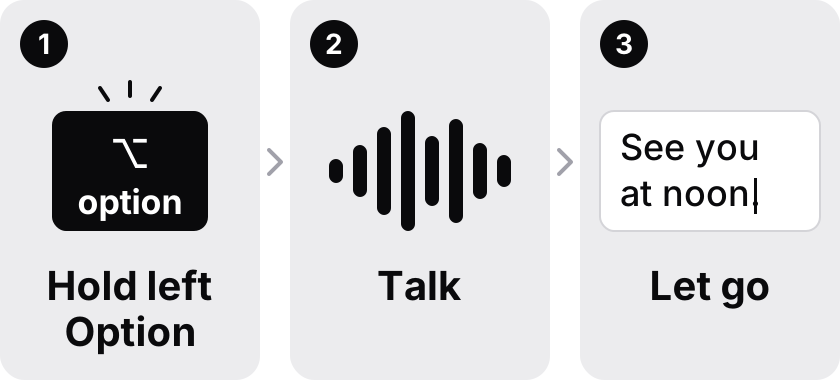
What it does differently is language mixing. It supports 30+ languages, and switching language in the middle of a sentence is the case it is built for, with grammar clean-up in every language it transcribes. Audio is processed in memory and discarded, and no audio or transcripts are stored.
Where it loses: it is Mac only, it has no free plan, it needs an internet connection, and it supports fewer languages than Wispr Flow, Superwhisper or MacWhisper. It is also a young product made by one person.
Pick it if you only use a Mac, speak more than one language in the same message, and want nothing kept. Try it free for three days or see pricing.
How to choose
- Need offline or local only: Superwhisper, MacWhisper or VoiceInk.
- Hate subscriptions: VoiceInk or MacWhisper, or Superwhisper's lifetime plan.
- Need Windows or Android too: Superwhisper or Aqua Voice.
- Want to pay nothing: Apple Dictation, or the free plans of Superwhisper and MacWhisper.
- Mix languages inside sentences on a Mac: EaseMyPease.
For a wider roundup that includes Dragon's history on the Mac, see the best dictation software for Mac.
Common questions
- What is the best free alternative to Wispr Flow on Mac?
- Apple Dictation is built into macOS. Superwhisper has a free plan with unlimited dictation on local Whisper models, and MacWhisper has a free version. Aqua Voice offers 1,000 free words. Checked 21 October 2026.
- Is there a Wispr Flow alternative that works offline?
- Yes. Superwhisper's local models transcribe without an internet connection, MacWhisper uses local models, and VoiceInk transcribes with local models on Apple Silicon Macs. EaseMyPease does not work offline.
- Is there a Wispr Flow alternative with a one-time price?
- VoiceInk costs $25 once for one Mac, MacWhisper Pro is €64 once, and Superwhisper sells a $249.99 lifetime plan. Wispr Flow Pro is $15 a month or $12 a month billed annually. Checked 21 October 2026.
- Which Wispr Flow alternative is cheapest?
- Among paid plans checked on 21 October 2026, VoiceInk at $25 once is the lowest upfront cost, but it needs an Apple Silicon Mac. Among subscriptions, Aqua Voice Pro at $8 a month billed annually and Superwhisper Pro at $84.99 a year cost less than EaseMyPease at $100 a year.
- Which alternative handles switching languages mid-sentence?
- EaseMyPease is built for it and applies grammar clean-up in every one of its 30+ languages. Wispr Flow says it detects the language you are speaking automatically. These apps have not been tested side by side on the same recordings.
Sources checked 2026-10-21
- https://wisprflow.ai/pricing
- https://wisprflow.ai/
- https://superwhisper.com
- https://superwhisper.com/docs/billing/plans
- https://superwhisper.com/docs/models/voice
- https://superwhisper.com/docs/get-started/quickstart
- https://www.macwhisper.com/
- https://tryvoiceink.com/
- https://aquavoice.com/
- https://aquavoice.com/pricing
- https://support.apple.com/guide/mac-help/use-dictation-mh40584/mac