Blog
Published 22 October 2026Apple Dictation vs EaseMyPease: is the built-in one enough?
For many people, yes: Apple Dictation is built into macOS, adds commas, periods and question marks on its own, and on supported setups runs on your Mac without sending audio to Apple. A paid app like EaseMyPease is worth it when you want messy speech cleaned up into tidy text, or when you switch languages inside a sentence and do not want to stop and click.
I build EaseMyPease, so this is not a neutral page. What I can do is quote Apple's own guide for every claim about Apple Dictation and date it. Everything below about Apple was read on support.apple.com on 21 October 2026.
What Apple Dictation does well
Start with the built-in one. It is already on your Mac, and it covers more than people expect.
- You start it with the Microphone key if your keyboard has one, with a Dictation shortcut you choose, or from Edit > Start Dictation.
- Apple says it "automatically inserts commas, periods, and question marks for you as you dictate." You can also say punctuation out loud, such as "exclamation mark", "new line" or "new paragraph".
- There is no length limit while you are talking. Apple's words: "You can dictate text of any length without a timeout."
- Apple says to check Keyboard settings to see whether your dictation is "processed on your device and not sent to Siri servers."
- On Apple silicon Macs you can keep typing while dictation is on.
If you write short messages in one language and you speak in finished sentences, Apple Dictation may be all you need. Our step-by-step guide to Mac dictation shows how to switch it on and pick a shortcut.
Where the built-in one runs short
These are the complaints that usually send people looking for something else.
It types what you said, not what you meant. Apple's guide describes automatic punctuation and spoken commands. It does not describe rewriting your speech: the "um", the restarted half-sentence and the repeated word arrive in the text as you spoke them. EaseMyPease has an optional grammar clean-up step that tidies those slips before the text reaches your cursor.
It stops when you pause. Apple: "Dictation stops automatically when no speech is detected for 30 seconds." If you think before you speak, you restart it often.
Switching language is a manual step. Apple lets you set up several dictation languages and says "you can switch languages as you dictate by clicking the language next to the cursor." That works when you change language between messages. It is slower when you change language halfway through one.
Availability varies. Apple notes that dictation "is not available in all languages or regions, and features may vary."
Side by side
| Apple Dictation | EaseMyPease | |
|---|---|---|
| Cost | Built into macOS | $10 a month or $100 a year, 3-day trial with no card |
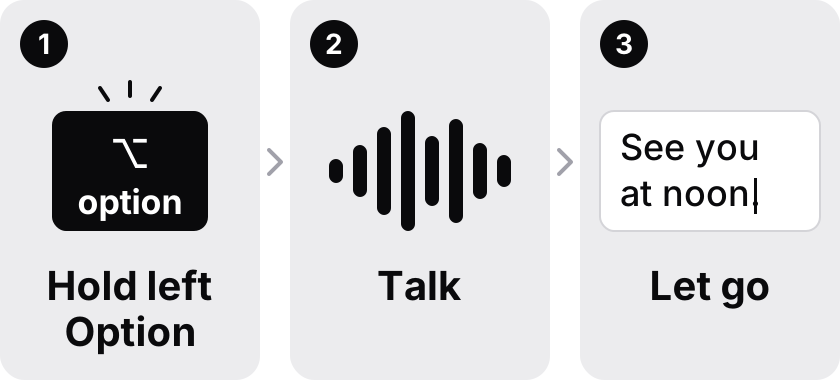
| How you start it | Microphone key, a shortcut, or Edit > Start Dictation | Hold a hotkey, speak, release |
| Punctuation | Automatic commas, periods and question marks, plus spoken commands | Automatic |
| Clean-up of slips and filler | Not described in Apple's guide | Optional grammar clean-up |
| Switching language | Click the language next to the cursor | Handled mid-sentence, with clean-up in every language it transcribes |
| Languages | Varies by language and region | 30+ |
| Where speech is processed | On device where supported; check Keyboard settings | Cloud. Audio is processed in memory and discarded, nothing stored |
| Works offline | Not stated in Apple's guide | No, needs an internet connection |
| Apps | Wherever you can type | Types at the cursor in any Mac app |
| Requirements | Comes with macOS | macOS 15 or later, Intel or Apple Silicon |
Apple facts from support.apple.com, checked 21 October 2026.
Privacy: different designs
Apple Dictation can run on your device, and when it does, your audio does not leave the Mac. That is the stronger privacy position, and EaseMyPease cannot match it, because transcription runs in the cloud.
What EaseMyPease does instead is keep nothing. Audio is processed in memory and discarded once the text is ready. No audio and no transcripts are stored. The dictionary of names and terms it learns from you, and your dictation history, stay on your Mac. If your rules say audio must never leave the machine, use Apple Dictation with on-device processing, or an app with local models such as Superwhisper or MacWhisper.
When the paid app is worth $10 a month
A rough test. Dictate three real messages with Apple Dictation, the kind you send every day. Then count how long you spend fixing them.
If you fix almost nothing, keep Apple Dictation. It is good, and it is already there.
If you spend time deleting filler words, rejoining broken sentences, or stopping to switch language, that is the gap EaseMyPease is built for. You hold the key, talk the way you normally talk, and the text that lands is punctuated and cleaned up. If you write in another language, pick it under Language in Settings and it types in that language.
Who should stay with Apple Dictation
- You write short messages in one language.
- You want dictation that can run entirely on your Mac.
- You do not want another subscription.
Who might prefer EaseMyPease
- You speak in rough drafts and want the text cleaned up for you.
- You mix languages inside sentences.
- You use an older Mac with macOS 15 and want the same results on Intel as on Apple Silicon.
Try it on your own messages for three days, no card asked for: download EaseMyPease. Prices are on the pricing page. For other options, including Wispr Flow and Superwhisper, see the best dictation software for Mac. If Apple Dictation is not working at all, start with our fixes guide.
Common questions
- Is Apple Dictation good enough for everyday use?
- For short messages in one language, often yes. It is built into macOS, adds commas, periods and question marks automatically, and has no length limit while you speak. It does not clean up filler words or restarts, it stops after 30 seconds of silence, and switching language means clicking the language next to the cursor.
- Does Apple Dictation add punctuation automatically?
- Yes. Apple's guide says it "automatically inserts commas, periods, and question marks for you as you dictate." You can switch that off in Keyboard settings, and you can also say punctuation out loud, such as "exclamation mark" or "new paragraph". Checked 21 October 2026.
- Why does Mac dictation stop by itself?
- Apple Dictation stops automatically when it detects no speech for 30 seconds. There is no limit while you are speaking, so the stop only happens when you pause.
- Is Apple Dictation more private than EaseMyPease?
- Where Apple processes dictation on your device, yes, because the audio never leaves your Mac. EaseMyPease sends audio to the cloud for transcription, processes it in memory and discards it, and stores no audio or transcripts.
- Does EaseMyPease work offline?
- No. It needs an internet connection because transcription runs in the cloud. Apple says its own dictation can be processed on your device, and Keyboard settings show whether yours is.