Blog
Published 22 October 2026A Superwhisper alternative for Mac: EaseMyPease compared
If you want a Superwhisper alternative that needs no model download and no setup of modes, EaseMyPease is one option: you hold a key, speak, and cleaned, punctuated text appears at your cursor in any Mac app. It costs $10 a month or $100 a year and runs in the cloud, so it is the wrong pick if you need to dictate offline or want a free plan.
I build EaseMyPease, so weigh this page with that in mind. Every fact about Superwhisper below was read on superwhisper.com on 21 October 2026, and the links are at the bottom so you can check them yourself.
The short answer
Superwhisper does more. It runs on Mac, Windows, iPhone and Android, it has a free plan with unlimited dictation on local models, it works offline, and it lists over 100 languages. EaseMyPease runs only on a Mac, has no free plan and needs an internet connection.
What EaseMyPease offers in return is a smaller app with fewer decisions. There is one hotkey and one behaviour. Grammar clean-up works in every language it transcribes, including when you switch language in the middle of a sentence. If you tried Superwhisper and spent more time choosing models and modes than dictating, that is the case where switching makes sense.
Price compared
| EaseMyPease | Superwhisper | |
|---|---|---|
| Free plan | None. A 3-day trial, no card asked for | Free plan: unlimited dictation with local Whisper models, up to two modes |
| Monthly | $10 | Pro $8.49 |
| Yearly | $100 | Pro $84.99 |
| Lifetime | Not offered | $249.99 once |
| Refund | 14-day money-back guarantee | "30 day refund available for all plans" |
| Devices | Mac only, macOS 15 or later | One Pro license covers "unlimited Macs and Windows PCs, plus your iPhone and Android phone" |
Superwhisper is cheaper per month, has a lifetime option, and one license covers your phone and a Windows PC too. New Superwhisper users also get 3,000 words of Pro features before the app falls back to the free plan. On price alone, Superwhisper wins.
Where speech is processed
This is the real difference between the two, and it cuts both ways.
Superwhisper lets you pick a voice model per mode. Local models run on your Mac and work without an internet connection. Its docs list Whisper models from 75 MB (Tiny) up to 3 GB (Large), and every Whisper model is free. Cloud models "run on hosted servers with no download", and those are part of Pro. Superwhisper's own FAQ adds that "Intel Macs work best with Cloud models" and that offline models "only run really well on Apple Silicon macs."
EaseMyPease has one path: audio goes to the cloud, is transcribed and cleaned up, and the text comes back to your cursor. Audio is processed in memory and discarded. No audio and no transcripts are stored. The dictionary of names and terms it learns from you, and your history, stay on your Mac. Because nothing runs locally, there is nothing to download and it behaves the same on an Intel Mac as on Apple Silicon.
So the honest tradeoff is this:
- If you need dictation on a plane, or your work rules say audio must never leave the machine, use Superwhisper with a local model. EaseMyPease cannot do that.
- If you are on the free Superwhisper plan, you are on local models, which means downloading one and having a Mac that runs it well.
- If you are paying anyway and want cloud transcription without picking a model, both can do it. EaseMyPease simply has no other mode.
Setup and day-to-day use
Superwhisper is built around modes. A mode decides which voice model runs, whether AI processing rewrites the text, and how the result is formatted. The free plan allows two modes, Pro allows unlimited ones. That flexibility is the reason many people like it: a mode for email, a mode for notes, a mode that translates into English.
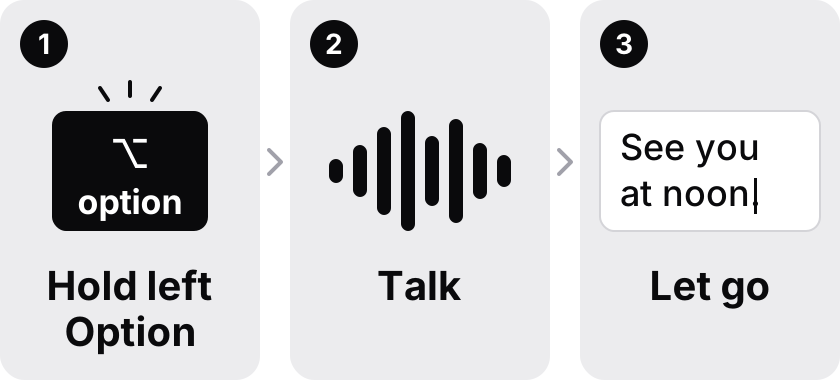
EaseMyPease has no modes. You install it, grant the permissions macOS asks for, hold the hotkey and talk. Punctuation is added for you, and the optional grammar clean-up fixes the obvious slips of speech. It also picks a tone from the app you are typing into, so a chat reply, an email, a document and code each come out a little differently, without you setting anything up. What you cannot do is write your own modes. If you want that control, Superwhisper gives it to you and EaseMyPease does not.
Languages
Superwhisper lists over 100 languages and dialects. EaseMyPease transcribes and cleans up text in 30+ languages. That is fewer, and if your language is rare, check Superwhisper first.
Where EaseMyPease puts its effort is mixing. Many people do not speak one language at a time: they start a sentence in Spanish and finish a technical term in English, or reply to a colleague in German and quote a product name in French. EaseMyPease is built so that switching mid-sentence is the ordinary case, and clean-up runs on the mixed text rather than only on English. The languages it does best, measured, include English, German, Spanish, Portuguese, Italian, French, Turkish, Russian, Japanese, Chinese and Indonesian.
Two known limits: Cantonese and Hawaiian fall back to the English clean-up prompt, and nothing works without a connection. The two apps have not been tested side by side on the same recordings, so I will not claim one is more accurate.
Who should stay with Superwhisper
- You dictate offline, or need audio to stay on your Mac.
- You want a free plan you can use indefinitely.
- You dictate on Windows, iPhone or Android as well as a Mac.
- You like building modes for different kinds of writing.
- You prefer paying once ($249.99 lifetime) to a subscription.
Who might prefer EaseMyPease
- You only use a Mac and want one hotkey with no modes to set up.
- You have an Intel Mac, where Superwhisper itself recommends cloud models.
- You switch languages inside sentences and want clean-up to handle both.
- You want a service that keeps no audio and no transcripts at all.
The quickest way to know is to try it. The trial lasts three days and does not ask for a card. Download EaseMyPease or see the pricing page. If you are still comparing, the Mac dictation roundup covers Wispr Flow, MacWhisper and Apple's built-in Dictation too.
Common questions
- Is there a Superwhisper alternative that does not need a model download?
- Yes. EaseMyPease transcribes in the cloud, so there is no model to download and nothing to choose. Superwhisper's own cloud models also need no download, but they are part of its paid Pro plan; its free plan uses local Whisper models, which range from 75 MB to 3 GB. Checked 21 October 2026.
- Is Superwhisper cheaper than EaseMyPease?
- Yes. Superwhisper Pro is $8.49 a month, $84.99 a year or $249.99 once, and it has a free plan. EaseMyPease is $10 a month or $100 a year, with a 3-day trial and no free plan. Superwhisper prices checked 21 October 2026.
- Does EaseMyPease work offline like Superwhisper?
- No. EaseMyPease needs an internet connection because transcription runs in the cloud. Superwhisper's local models work without a connection, and its FAQ says they run best on Apple Silicon Macs.
- Does Superwhisper work on Intel Macs?
- Superwhisper's FAQ says "Intel Macs work best with Cloud models" and that offline models "only run really well on Apple Silicon macs." EaseMyPease is a universal app for Intel and Apple Silicon, and because it runs in the cloud it works the same on both.
- Which one supports more languages?
- Superwhisper lists over 100 languages and dialects. EaseMyPease supports 30+ languages for transcription and clean-up, and handles switching language in the middle of a sentence.