Blog
Published 22 October 2026MacWhisper vs EaseMyPease: which Mac app fits you
MacWhisper is best known as a transcriber for audio and video files that runs on your own Mac, with a free version and a one-time Pro license of €64. EaseMyPease does one job, live dictation: you hold a key, speak, and cleaned, punctuated text appears at your cursor in any app, transcribed in the cloud for $10 a month or $100 a year.
I build EaseMyPease, so read this with that in mind. Every fact about MacWhisper below was read on macwhisper.com on 22 October 2026, and the links are at the end.
The short answer
If your work starts with a recording, such as an interview, a lecture, a podcast or a meeting, MacWhisper is the better tool. It takes files in, runs local models, exports subtitles and documents, and you pay once.
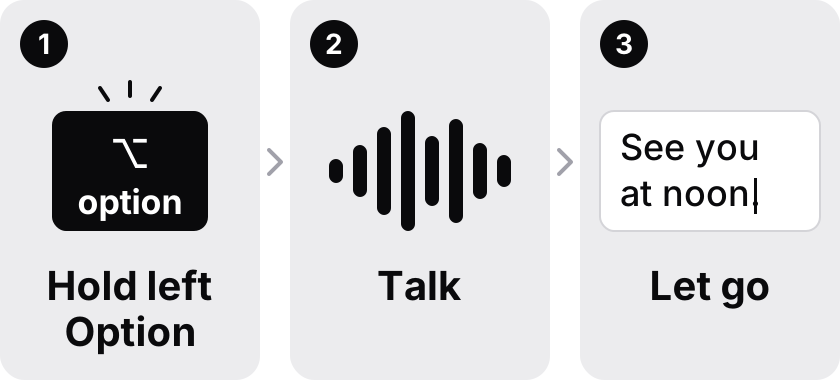
If your work starts with a blank text box, such as an email or a chat reply, you want dictation. MacWhisper has dictation too, so this is not a case of one app having it and the other not. The difference is what each app is built around. EaseMyPease has no file features at all. It is only the hold, speak, release loop, tuned to the app you are typing into.
What MacWhisper does
The MacWhisper home page lists a long set of features. The ones that stand out:
- File transcription for mp3, wav, m4a, ogg, opus, mov and mp4, with batch transcription of several files at once.
- Transcribing YouTube and other media links.
- Automatic speaker recognition, which labels who said what.
- Export to subtitles (.srt and .vtt) and to .txt, .md, .pdf, .html and .docx.
- Recording meetings in Zoom, Teams, Webex, Skype, Chime, Discord and others, with automatic start and end detection.
- Watched folders that transcribe new files as they appear.
- A command line interface, and uploads to Notion, Zapier, Obsidian, n8n and webhooks.
Under a "Dictation" heading the page also lists "System wide dictation", "Automatic grammar improvement", "Dictate with AI prompts" and "App Specific Prompts". So MacWhisper can dictate into other apps, and it can apply different prompts per app. The home page does not say which of these features are in the free version and which need Pro, so check that before you buy.
On privacy, the page says "We use local models to transcribe your files", and that you can "Process sensitive content locally without data ever leaving your Mac." It also lets you bring your own API keys for providers such as OpenAI, Anthropic, Groq, xAI, Azure, Deepseek, Google and OpenRouter, or run local AI models through Ollama and LM Studio.
Price compared
| EaseMyPease | MacWhisper | |
|---|---|---|
| Free plan | None. A 3-day trial, no card asked for | Free version, "Free forever" |
| Paid | $10 a month or $100 a year | Pro €64 once per license, "Includes lifetime updates" |
| Refund | 14-day money-back guarantee | The page has a refund policy section; I could not read its terms |
| Where speech is processed | Cloud only | Local models on your Mac, with optional cloud AI providers using your own keys |
| Needs internet | Yes | Not for local transcription |
| File transcription | No | Yes |
| Live dictation into any app | Yes, the whole product | Yes, listed as "System wide dictation" |
On price, MacWhisper wins clearly. €64 once is less than seven months of EaseMyPease, and the free version costs nothing.
Where speech goes
This is the deciding question for many people.
MacWhisper runs speech models on your Mac. That means it works offline, and for local transcription your audio stays on your machine. The cost is that the Mac does the work, so speed depends on your hardware and the model you choose. MacWhisper's site has a system requirements section, but I could not read its details, so I will not guess at numbers.
EaseMyPease sends audio to the cloud, where it is transcribed and cleaned up, and the text comes back to your cursor. Audio is processed in memory and discarded. No audio and no transcripts are stored. The dictionary of names and terms it learns from you, and your history, stay on your Mac. Because nothing runs locally, there is no model to download, and it behaves the same on an Intel Mac as on Apple Silicon. The price of that is simple: no internet, no dictation.
If your rules say audio must never leave the machine, use MacWhisper with a local model. EaseMyPease cannot meet that rule.
Dictation day to day
Since both apps dictate, here is what EaseMyPease does differently, without claiming it is more accurate. The two have not been tested side by side on the same recordings.
EaseMyPease picks a tone from the app you are typing into. A reply in Slack or WhatsApp comes out casual, a message in Mail comes out as proper prose, a note in Pages or Notion reads like a document, and in a code editor or terminal the clean-up is more technical. You set none of this up. MacWhisper's "App Specific Prompts" let you do something similar by hand, which suits people who like to write their own prompts.
EaseMyPease transcribes and cleans up text in 30+ languages, and it handles switching language in the middle of a sentence, with clean-up running on the mixed text. MacWhisper lists over 100 languages, so if yours is less common, check MacWhisper first.
There are also limits on the EaseMyPease side worth knowing: Cantonese and Hawaiian fall back to the English clean-up prompt, and it needs macOS 15 or later.
Who should pick MacWhisper
- You transcribe recordings, meetings or videos, and want subtitles or documents out.
- You need to work offline, or audio must stay on your Mac.
- You would rather pay once than subscribe.
- You want to write your own AI prompts and choose your own providers.
Who might prefer EaseMyPease
- You mostly write, and want speech to become text in the app you already have open.
- You do not want to choose models, providers or prompts.
- You have an Intel Mac and want the same speed as on Apple Silicon.
- You switch languages inside a sentence and want clean-up to handle both.
Some people will want both: MacWhisper for files, EaseMyPease for typing. They do different jobs, so that is not a strange setup.
The trial lasts three days and does not ask for a card. Download EaseMyPease or see pricing. If you are new to dictation on a Mac, start with how to dictate on a Mac. Still comparing? Read the Superwhisper alternative page or the Wispr Flow alternatives list.
Common questions
- Is there a MacWhisper alternative for live dictation?
- Yes. EaseMyPease is built only for live dictation: hold a key, speak, and cleaned text appears at the cursor in any Mac app. MacWhisper also offers system wide dictation, but its main focus is transcribing files and recordings.
- Does MacWhisper have dictation?
- Yes. Its home page lists "System wide dictation", "Automatic grammar improvement" and "App Specific Prompts". The page does not say which of these need Pro. Checked 22 October 2026.
- Is MacWhisper cheaper than EaseMyPease?
- Yes. MacWhisper has a free version, and Pro is €64 once with lifetime updates. EaseMyPease is $10 a month or $100 a year, with a 3-day trial and no free plan.
- Does EaseMyPease work offline like MacWhisper?
- No. EaseMyPease transcribes in the cloud and needs an internet connection. MacWhisper runs local models on your Mac.
- Can EaseMyPease transcribe audio files?
- No. It only turns live speech into text at your cursor. For files, meetings and subtitles, MacWhisper is the better choice.
Sources checked 2026-10-22
- https://www.macwhisper.com/
- https://www.macwhisper.com/dictation (page exists, but its feature sections were placeholder text when checked)